
-
Top 5 FREE tools for a new SQL Server DBA

Photo by Pixabay on Pexels.com These are my top 5 Free tools (Other than SSMS) for a new SQL Server DBA or for those accidental DBA’s.
- PowerShell 5.1 with DBATools module loaded
- Want to automate your DBA tasks? This is the best place to start. There are commands in this module that allow you to install the remaining tools in this blog post. The command’s list can be a bit daunting but luckily there is a great book out there for learning DBATools.
- Ola Hallengren Maintenance Solution
- STOP Using the built in SQL Server Maintenance Plans. They are notoriously difficult to maintain and troubleshoot. Instead grab this script. It creates SQL Agent Jobs (which are far easier to maintain and troubleshoot) for the majority of DBA needs. Once the script is run, it’s up to you, the DBA to configure the settings.
- sp_whoisactive
- Adam Machanic wrote this stored proc to provide a replacement/improvement to the sp_who and sp_who2 built in activity monitoring procs that come with SQL Server. The next best thing to do is create a job that runs this every minute and dumps the results to a dbo.whoisactive table in your DB_Admin database. You do have a db_Admin database, right? No? Time to create one.
- Glenn Berry’s Diagnostic DMV’s
- TONS of valuable information here in these DMVs. I use this to really getting a better understanding of the environment I’m working in. It’s truly amazing the amount of information that can be gained from running some of these queries. Again these results can sometimes best be consumed when dumping to a table or even to an Excel spreadsheet.
- Brent Ozar’s First Responder Kit
- Last but certainly not least is the Brent Ozar first responder kit. So you just took over from the last DBA or you were told you are now the proud owner of a SQL Server instance. Things are already on fire and everyone wants you to be the hero of the day. What do you do? First things first, run sp_blitzfirst. After tackling some of the most important priority items on that list, you can then run sp_blitz to get an overall health status of the SQL Server instance and databases. My two other favorites from the kit are sp_blitzcache and sp_blitzindex.
There is one tool that I usually spend money on instead of going the free route, and that’s a monitoring and alerting tool. SQL Sentry is usually my go to but do your research and choose the one that fits your style and budget.
I’d love to hear from the community about some of the free tools you use. I’m always on the lookout for something that will make my life as a DBA easier.
- PowerShell 5.1 with DBATools module loaded
-
Ola Hallengren RAISERROR Error creating directory

STOP! THINK! ACT!
New and Old DBAs alike have often relied on the Ola Hallengren maintenance solution. For those that are fairly new to the maintenance plans you may come across a situation where you looked for why a backup or integrity job failed. Typically a DBA will start off by looking at the Job History to see if they can determine what happened. What you often find in these situations is the actual command output from the Ola job and not the actual failure. And what usually throws people off is when they see the IF @ReturnCode <> 0 RAISERROR(‘Error creating directory.’,16, 1). This is not an actual error. This is simply still part of the code that the Ola job is using in it’s command.
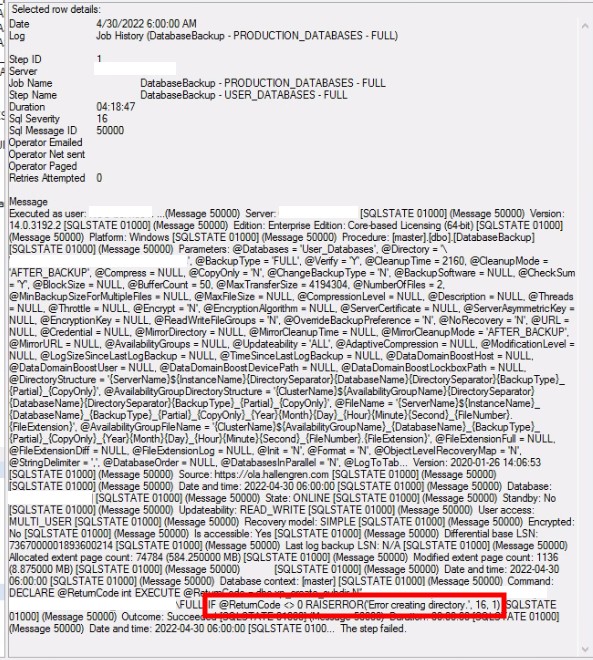
To truly understand the failure, we must consult the logs that Ola spits out. These Ola logs are by default placed in the same directory as the SQL Error Logs.
Any easy way to find out where these are kept is by running this T-SQL code in a query window.
SELECT SERVERPROPERTY('ErrorLogFileName') AS 'Error log file location'If you still need help locating the Error Log File location you can use the steps outlined in the following links:
https://www.mssqltips.com/sqlservertip/2506/identify-location-of-the-sql-server-error-log-file/
-
New Blog of the New England DBA

It’s about time I got here! Thank you for visiting my blog. I hope that you are able to learn something new while you are here. Feel free to leave a comment. I am always happy to talk about SQL Server database administration and would love to help in any way I can.
I intend to make the majority of these blog posts about SQL Server database administration but I may tangent off into other related areas like hardware, security, IT Governance, Architecture, and so on.
 New England DBA